I tried to find a way to do this via Google and PT forums, but info was pretty sketchy (as far as PT2 is concerned) so I decided to put all info here to share.
I will try my best to answer all PostgresQL related questions, but you're better off asking them in the PT forums on PokerTracker.com
(This is pretty much a rough draft. I would have to redo all these steps for more screenshots and i'm too lazy ATM, so if you face problems, send a screenshot, then i'll update this as necessary. Any suggestions to clean this article up are also appreciated.)
- THIS PERTAINS TO PT2. If you run PT3, you're on your own, although i'm sure that some of this info can pertain for PT3 as well.
- I AM NOT RESPONSIBLE IF YOU SCREW UP YOUR DATABASE I am here to relay my own experiences. If you want to take the plunge, continue reading.
The main reasons why I decided to do this is for:
A) The challenge. (PT2 said it couldn't be done! Here's Proof! (This was 9 months ago though  )) ))
B) PostgresQL 8.3 has noticeable performance speed over 8.2
C) Stay on the Bleeding Edge :D (If PT3 can use PostgresQL 8.3, then why can't PT2 use it too?)
D) Cuz I got nothing better to do.
Before we get started, I'd like to mention a few things.
- I'm running Vista on my laptop. PostgresQL 8.3 doesn't like to play nice with Vista so you might face some extra hurdles along the way.
- Latest PostgresQL version that I know that works is 8.3.5.
- I haven't tried this on XP. If I attempt this in the future on an XP machine, I will update it.
- This is not for the faint of heart. In other words, if you're a noob, it's probably not a good idea. However, I'll try to explain this as thorough as possible.
Ready to take the plunge? If so, keep on reading.
(All this is assuming you are running PostgresQL 8.2 series)
*FOR VISTA USERS: You might want to disable UAC. Instructions can be found on Google or any search engine.
NOTE: This isn't as simple as installing 8.3 over 8.2. If it was, then there wouldn't be a point in doing this. In addition, PT2 cannot create a new database to PostgresQL 8.3 (yet). To sum up: You have to backup 8.2 database and then restore in 8.3. For more in depth, keep on reading.
Needless to say, this is irrelevent for Access users. However, if you're willing to convert ur database, Instructions to install and run PostgresQL are here: Install PostgresQL
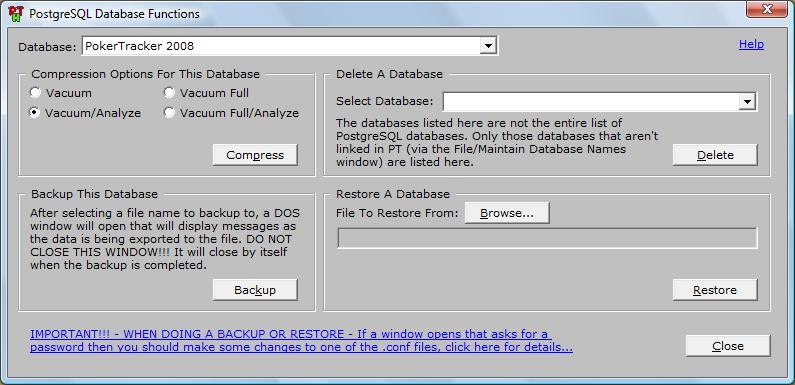
First thing's first. Backup your database by going to Utilities>>PostgresQL Database Functions. For this example, we will say you have named it "Backup.backup" and have saved it on your Desktop. (Backup all other databases if you have more than one.)
Now the fun part begins. Once that step is done, go to PostgreSQL 8.3.x. Download BUT don't run it yet. We have a few more steps left to do before installing 8.3
Uninstall PostgresQL 8.2 by going to Control Panel>>Programs or Features (Or Add/Remove Programs for XP) Uninstall PostgresQL 8.2 and all other related programs.
Even though we have uninstalled PostgresQL, there are still data files left. Go to your Program Files folder (Usually on C:/Program Files/) There should be a folder named PostgresQL. I suggest you move that folder to your Desktop or Documents folder, however u can delete it if you want. Main point: Get that folder out of there.
Now that that step is finished, we can install PostgresQL 8.3. :D
Locate the installer, and double click to install.
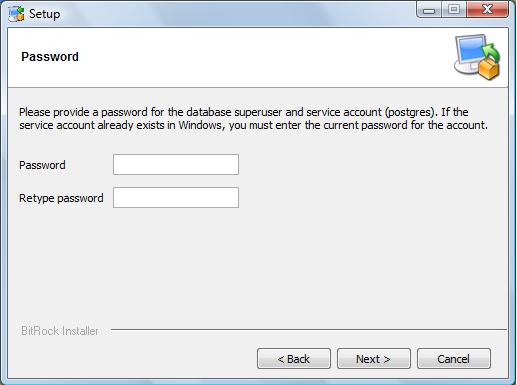
Insert the SAME password that you put in your PostgresQL Settings in PT2 (Utilities>>PostgresQL Settings.)
At this point. It might initialize a new database cluster. Go ahead and create it. Make sure it points to port 5432.
At the end of install, there is the last window with a checkmark box to "Launch Application Stack Builder". Make sure it IS checked, and click Done.
This should show up.
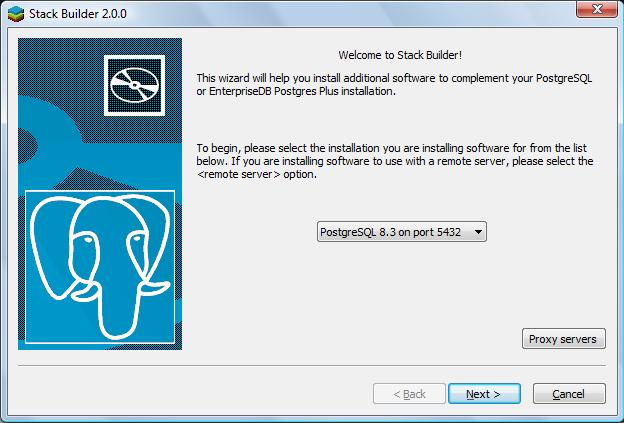
Make sure you select PostgresQL 8.3 in the drop-down list and continue on.
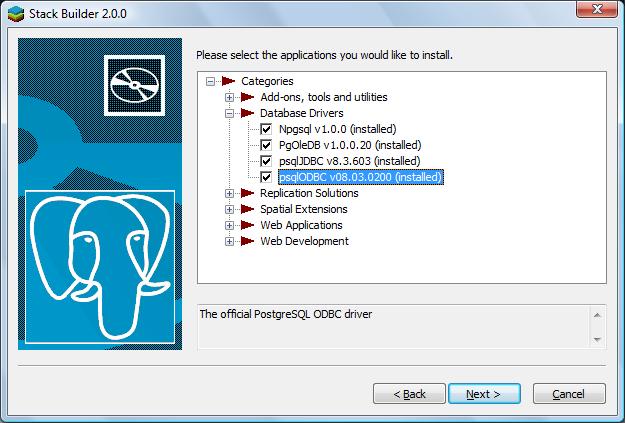
You MUST install the following drivers.
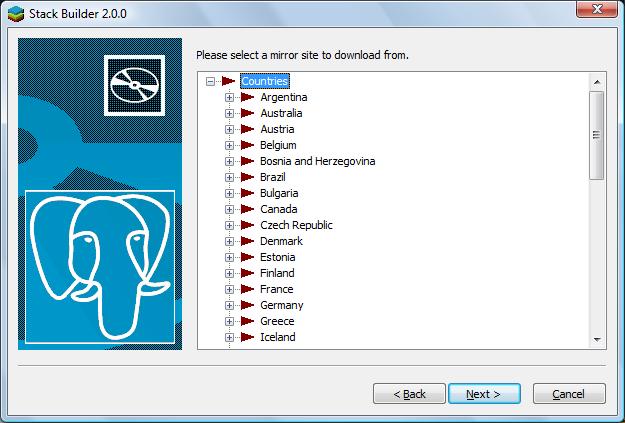
Select a Mirror to which you will download your drivers, and start downloading :D
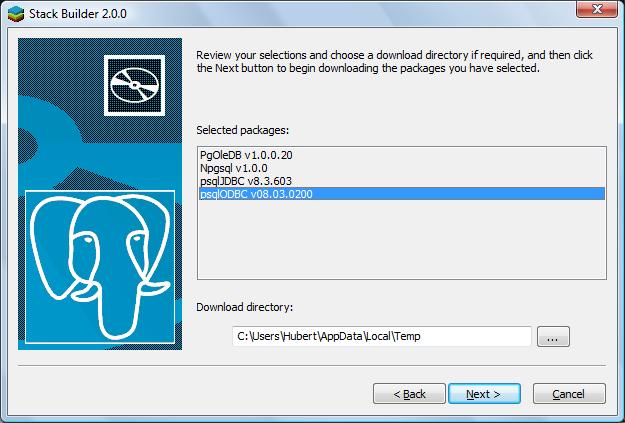
Click Next
Unfortunately, I can't show you screenshots of the next few steps. However, trust me, it's very very simple.
You will receive 4 installs, one after the other. These are the individual installs for the drivers you have downloaded. Accept the Install agreements, and install all four of them.
After you are done with all of this, restart your comp. Cross your fingers for the next step.
After that is done, run PT2. If there aren't any error windows, GREAT!!! The rest is clear sailing :D However, some might have several error windows. Ignore most of them, these messages are saying that it can't create the PostgresQL tables that are needed. We will address these later on. These 2 are the main ones to look out for:
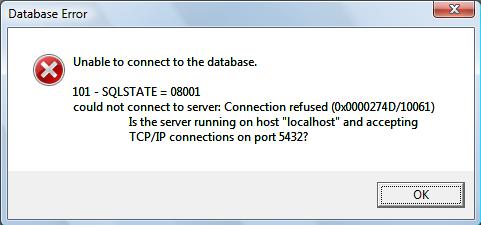
This means that the PostgresQL service is not running. Go to Start>>Programs>>PostgresQL 8.3>>Start Service.
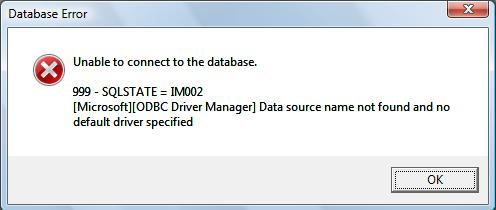
This means that you didn't install the drivers or they aren't loaded correctly. Reinstall them by going to Control Panel>>Programs and Features (Add/Remove Programs), remove them and try reinstalling them by going to Start>>Programs>>PostgreSQL 8.3>>Application Stack Builder.
If these windows keep on showing up, then something wasn't configured right. Unfortunately, I can't help you with that. You will have to uninstall, remove the PostgresQL folder from Program Files, and reinstall Postgres 8.3.
Once that is done, then go to Utilities>>PostgresQL Database Functions.
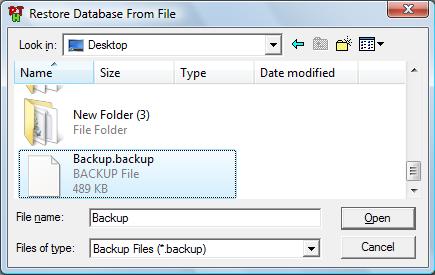
Restore your Database from the backup file you saved on your desktop.
After selecting it and clicking ok, there's an extra step. You will get a similar window asking where "pg_restore.exe" is. This program is under "C:/Program Files/PostgreSQL/8.3/bin" Point to it, and click OK.
Once done, let it restore your database. It will restore all your tables to 8.3 standards.
Once this is done, no more error messages should bother you :D
Go to File>>Maintain Database Names. Select your "Restored" Database as the Default as necessary and remove all unnecessary entries.
At this point, I would go to Utilities>>PostgresQL Database Functions to compress the database.
In addition, you can now create databases without error messages under PostgresQL via File>>Maintain Database Names.
At this point, you can also get rid of the 8.2 data files from Postgres folder that was in C:/Program Files/
Optional Step: If you have a LARGE database, It would be a good idea to cluster the database. I haven't done it yet, (My current database is 200k hands) and unfortunately for PT2 users, there isn't an option to cluster. However, PT2 forums has steps laid out on how to cluster.Clustering Instructions
Enjoy your new 8.3 database!!!


|




 Contact Users: 647 Active, 1 Logged in - Time: 02:03


 United States. Nov 18 2008 00:55. Posts 8955


 ,
,
 ,
,
 ,
,


 ,
,